Caller ID
From VoIP.ms Wiki
(Difference between revisions)
| [draft revision] | [checked revision] |
| (70 intermediate revisions not shown) | |||
| Line 1: | Line 1: | ||
| - | + | {| class="wikitable" | |
| + | |+ | ||
| + | |- | ||
| + | ! Article en Français !! Artículo en Español | ||
| + | |- | ||
| + | | [https://wiki.voip.ms/article/ID_de_l%27appelant Français] || | ||
| + | [https://wiki.voip.ms/article/Numero_Identificador_(Caller_ID) Español] | ||
| + | |} | ||
| - | |||
| - | + | == Blog Article == | |
| + | <!-- START BOX --> | ||
| + | <div style="position: relative; width: 90%; height: 20px; | ||
| + | background: linear-gradient(to right, #f8f9fa, rgba(255, 0, 0, 0)); | ||
| + | border: 1px solid transparent; | ||
| + | border-image: linear-gradient(to right, #dee2e6, rgba(255, 0, 0, 0)); | ||
| + | border-radius: 8px; padding: 12px; overflow: hidden; display: flex; align-items: left; justify-content: left; text-align: left; font-family: sans-serif; color: #333;"> | ||
| + | <div style="position: absolute; font-size: 100px; opacity: 0.15; z-index: 1; pointer-events: none; user-select: none; transform: rotate(-10deg);">📰</div> | ||
| + | <p style="position: relative; z-index: 2; margin: 0; line-height: 1.5; background: none !important;"> | ||
| - | + | 📃 [https://wiki.voip.ms/article/What_Is_CNAM_and_How_to_Leverage_It_for_Your_Business%3F What Is CNAM and How to Leverage It for Your Business?] | |
| - | + | </p> | |
| + | </div> | ||
| + | <!-- END BOX --> | ||
| + | |||
| + | = Caller ID = | ||
| + | : Caller ID is a telephone service that transmits the calling party´s number to the called party´s telephone . When available, the Caller ID number can be complemented with Caller ID name (e.g., John Smith). | ||
| + | : If you are placing outgoing calls, you will need to pass a Caller ID to ensure proper termination of your calls. | ||
| + | : There are two types of caller ID and it is important to differentiate them: Caller ID Number (CID) and Caller ID Name (CNAM). | ||
| + | : Please note that the Caller ID is only guaranteed when using Premium routes, and only for US48 and Canadian calls. In Canada you may find Caller ID working on some Value routes. | ||
| + | : Incoming Caller ID (from people calling you) is addressed below. | ||
__TOC__ | __TOC__ | ||
| - | = | + | = Caller ID Rules = |
| + | : In line with all the rulings in favor of protecting and empowering consumers, VoIP.ms enforces valid Caller IDs as per the NANPA and ITU-T E.164 standards. | ||
| + | : Therefore, calls displaying the following Caller ID information will be rejected: | ||
| - | + | : * International calls with Caller ID containing '''less than 7 digits''' and '''greater than 15 digits'''; | |
| + | : * North America calls with Caller ID not containing exactly '''10 digits''' ''(exception will be made for 7 digits for 310-xxx numbers)''; | ||
| + | : * North America calls with Caller ID containing '''10 digits''', but with an unassigned NPA (first 3 digits of the number); | ||
| + | : * North America calls with Caller ID containing '''10 digits''', but where an unassignable NXX is used (i.e. the second block of 3 digits where the first digit is either zero (0) or one (1)). | ||
| - | |||
| - | + | == Outgoing Caller ID Name == | |
| + | : The Caller ID name is an additional information you can pass along with your Caller ID number. This will be received on the callee's end and it could be your given name or the name of your business. | ||
| + | :: For example: ''"John Smith" <9145551234>'' | ||
| - | + | : The sample above is a Caller ID that includes both Caller ID name and Caller ID number, commonly abbreviated as CID and CNAM among other variations. | |
| + | : It is not possible to set a Caller ID name from the VoIP.ms portal. | ||
| - | If you | + | : If you plan to make calls to Canadian numbers, you can simply pass the Caller ID name from your device or system as most of them support this.'''*''' <br/> |
| + | : You will need to check for a field on the interface from the device to enter this setting, and in case you are using a more advanced system, get assistance to set the outgoing Caller ID name set up. | ||
| - | + | : The Caller ID name on US calls works differently, this is controlled by a national CNAM database with records of numbers and names matching each number. | |
| - | + | : When you make a call to a US number, you will send a Caller ID number and the system will check the CNAM database for a name matching that same Caller ID number in order to display both name and number to the final phone. | |
| + | : CNAM is only available for some USA numbers. In order to update your Caller ID'''*''' on the CNAM database for your US calls, there is a process to follow which has a cost of $10 USD (one time only fee). | ||
| + | : Please contact the VoIP.ms support staff to get further details on what information you need to submit and to confirm if your local US DID is available for a CNAM update. | ||
| - | + | :: '''CNAM update is only available for some Local US DIDs. Toll frees cannot have their Caller ID name updated'''. | |
| - | + | <div style="border-left: 6px solid blue; background-color: lightgrey; width: 85%;"> | |
| + | '''IMPORTANT''': | ||
| + | - We suggest entering your outbound Caller ID Name must be in '''CAPITAL LETTERS'''. This will appears more clearly/visible on some devices. | ||
| + | - You must NOT use any special characters, they will not be displayed. | ||
| + | - Do not exceed '''15 characters''' max! Some of regular Canadian providers will not show more than '''15 characters'''. We suggest shrinking or adapt your caller ID. | ||
| + | - Spaces are allowed in a caller id name. | ||
| + | </div> | ||
| - | + | == Outgoing Caller ID Number == | |
| + | : Caller ID number is the most common Caller ID type passed. If a more complex system capable of passing its own Caller ID is being used, such as a [[Welcome#PBX|PBX]], the Caller ID field is likely set from the trunk, or one of its extensions. | ||
| + | : If you are using devices like [[Welcome#Devices|Analogue Telephone Adapters]], [[Welcome#Devices|IP phones]], or [[Welcome#Softphones|softphones]], the Caller ID number is available to be set from your VoIP.ms account via the customer portal. | ||
| - | + | == Outbound Caller ID - Main account == | |
| + | : To set the Caller ID number for your Main account, access: | ||
| - | + | :: '''1'''. Form your VoIP.ms Portal, go to "[[Account Settings]]" from '''Main Menu''' -> '''Account settings''' | |
| + | ::: [[File:AccountSettingsMenu.png|thumb|none|400px|Account settings]] | ||
| + | :: '''2'''. Go to '''General''' Tab and there set the '''CallerID number''' | ||
| + | ::: [[File:VoIPms_AccountSettings_General_CallerID_Number.png|thumb|none|400px|General]] | ||
| - | |||
| - | + | == Outbound Caller ID - Sub Accounts == | |
| - | + | :The Caller ID number for a sub account can be set during the creation process, or later by clicking Edit on the [[Sub Accounts|subaccount]]. | |
| + | ::[[File:CallerIDSubAcc.png|thumb|none|700px|CallerID field in a sub account]] | ||
| - | |||
| - | |||
| - | ''' | + | |
| + | : * '''For calls to US and Canada, a 10-digit Caller ID number is required to ensure proper call termination. The portal's Caller ID field only supports numerical digits.''' | ||
| + | : * '''Toll free Caller IDs are not recommended, especially when Calling Toll free numbers, to reduce potential connection issues.''' | ||
| + | |||
| + | : If you are using an analog telephone adapter (ATA), IP phone, or softphone, this is where you need to adjust the settings. | ||
| + | : It is important to ensure that you transmit a valid caller ID to ensure proper termination. | ||
| + | |||
| + | : Here you will have the option of having one of your incomings DID numbers displayed as an outgoing call identification number. | ||
| + | : You can also use a personalized number that does not appear in your lists of DID numbers. | ||
| + | |||
| + | : However, you must respect the standards in force by the regulations to this effect. | ||
| + | : '''Always use a number that belongs to you''' or to that '''you have permission to use''' as the outgoing call display number. | ||
| + | |||
| + | : '''I use a system of capable of passing its own CallerID Number''': If you have a PBX that manages the outgoing call identification number, you will have an option for this. | ||
| + | |||
| + | :: ''Note: Using a Toll free outbound caller id is not recommended, especially when calling Toll-Free numbers.'' | ||
| + | |||
| + | |||
| + | =Different methods of passing your Caller ID Number= | ||
| + | '''CallerID Number''': You can set the [[Caller ID|callerID Number]] or your DID Number or proceed with a verification process to pass the callerID of a number that is not within VoIP.ms network. If you have a a device capable of passing its own [[Caller ID|CallerID number]] such as a soft switch or [[PBXs|PBX]], make sure that the callerID matches a DID or a verified number from within your account to successfully make outgoing calls. | ||
| + | |||
| + | *'''Use one of my DIDs''': If you want to pass one of your DID Numbers as the callerID Number, select this option and choose the DID, if more than one, that will display on the called party. | ||
| + | |||
| + | * '''Use a Verified CallerID''': This is a quick verification process to ensure that the callerID you will pass is validated and authorized to be used. To start the process: | ||
| + | |||
| + | : '''1'''. Simply click on '''Click here to get started''' above the CallerID Number setting | ||
| + | ::: [[File:VoIPms_AccountSettings_General_Number_Verification_Section.png|none|650px]] | ||
| + | : '''2'''. Follow the CallerID Verification Process | ||
| + | :: '''1'''. Select the country of your DID and Enter the number you want to verify. | ||
| + | :: '''2'''. You can also add a reference/note for your own use. | ||
| + | :: '''3'''. Choose the verification to be done by receiving a call or by receiving a SMS (only available for Canada/United States). | ||
| + | ::: [[File:VoIPms_Non-VoIPms_Number_Verification.png|none|650px]] | ||
| + | : '''3'''. Once you press '''Send verification Code''', you will receive a phone call / SMS message with a validation code. | ||
| + | :: Enter that code in the '''Validation Code''' field and press '''Verify'''. | ||
| + | ::: [[File:VoIPms_Non-VoIPms_Number_Verification_Code.png|none|650px]] | ||
| + | |||
| + | :: > If for any reasons you have not received the code, you can ask the system to send it again or press cancel to change the method you would like to receive the code. | ||
| + | |||
| + | : * '''I use a system capable of passing its own CallerID''': If you are using a PBX, you will need to pass the callerID directly from your system. | ||
| + | :: Our system will verify if the callerID you are passing matches one of your DID or one of your verified callerID. | ||
| + | :: If you are passing an invalid callerID and attempt to make an outgoing call, our system will send you an email advising that a call was attempted with an invalid callerID. | ||
| + | |||
| + | |||
| + | |||
| + | |||
| + | ==Outbound caller ID number using Call Forwarding== | ||
| + | : When you chose to forward all your incoming calls from your VoIP.ms number to an external phone number, the original's caller ID number will be transmitted to this external number. | ||
| + | : However, if the incoming caller is hiding their phone number this call will fail due to the new regulations for CID, on where sending a valid caller ID number is mandatory. | ||
| + | |||
| + | : A workaround is to create a filter for '''"Anonymous"''' calls along with another call forwarding entry but this one using the '''"Caller ID number override"'''. | ||
| + | : This way, incoming calls using a valid CID will be transmitted to your external number showing the original's CID and incoming calls hiding their number will use the filter and the forward with caller ID Override, showing the CID override number and completing the call. | ||
| + | |||
| + | : '''To receive "Anonymous" calls when using call forwarding, follow these steps:''' | ||
| + | :: '''1'''. Go to '''DID Numbers>> Call forwarding''' section and create a new call forwarding entry to the same number you're forwarding to, but this new entry will contain the '''"Caller ID override"'''. For the caller ID override, you can type your VoIP.ms number or any valid number you want to see when you receive an anonymous call. You might want to fill the '''"Description field"''' so you can identify this entry on the next step. | ||
| + | :: '''2'''. Thereafter, go to '''DID Numbers>> CallerID filtering''' section and create a new filter. | ||
| + | ::: * For step 1, mark '''"Anonymous CallerID number"''' checkbox | ||
| + | ::: * For step 2, this is optional you can choose to apply this filter to all your numbers or just to a specific one. | ||
| + | ::: * For Step 3, mark the '''"Call forwarding"''' checkbox and make sure to use the call forwarding entry with the caller ID override number. | ||
| + | ::: * Save your filter. | ||
== Incoming Caller ID number and name == | == Incoming Caller ID number and name == | ||
| - | You will receive the Caller ID number and Caller ID name that the | + | : You will receive the Caller ID number and Caller ID name that the VoIP.ms server receives from the caller, this is exactly what will be sent to you on Incoming calls. |
| - | You can always check what Caller ID number | + | : You can always check what Caller ID number VoIP.ms receives by going into your [[Call Detail Records]] to check the incoming calls. |
| - | The incoming | + | : The incoming Caller ID name works almost the same way, except that this is an optional setting that you need to enable per DID number on the [[Manage DID|DID settings]] page. This option is called "CallerID Name Lookup". : When enabled, the system will perform a query on the LIBD/CNAM Database, for callers with Canadian or US CID number, in order to find a name matching that CID number. The system then will display the result of this query in the Caller ID name portion of the '''Caller ID''', leading to a "Caller ID name"<5551231234> when people call your number. |
| - | This option is called " | + | |
| - | The system then will display the result of this query in the Caller ID name portion of the '''Caller ID''', leading to a "Caller ID name"<5551231234> when people call your number. | + | |
| + | : If the calling number is already in your [[phone book]], the name will be taken from there instead of doing a CNAM lookup on an external database. | ||
| + | |||
| + | :: '''IMPORTANT NOTE FOR CANADIAN DIDs''' | ||
| + | :: The majority of the Canadian DID numbers support CNAM Pass-Through. | ||
| + | :: This means that for your incoming calls the system '''won't do a CNAM query''' (and also not charge you) if the incoming call already has a Caller ID name, even if the DID receiving the call has the CNAM queries enabled in your VoIP.ms customer portal. | ||
---- | ---- | ||
| + | |||
| + | == Listen to the current account's Caller ID Number == | ||
| + | : To listen to the caller ID set in the account you're dialing from, please dial '''822''' and the Caller ID number will be read back. | ||
| + | : Notice that it will depend on your device's dial plan or dial pattern for this to work. | ||
| + | : These test calls won't have any cost for you and will appear in your [[Call_Detail_Records | CDR]] as "CallerID Testing". | ||
| + | |||
| + | |||
| + | |||
| + | ==Configuring your CallerID with the Reseller Portal== | ||
| + | : Once within the reseller portal, head into Services, My Services to see the callerID options. | ||
| + | : The options available are the same as your main account or sub accounts. | ||
| + | :: [[File: CallerIDverif_Reseller.png |thumb|none|600px]] | ||
| + | |||
| + | =Notes= | ||
| + | |||
| + | <div style="position: relative; width: 90%; /* height: 20px; */ background-color: #f0fbff; border: 2px solid #2f6185; border-radius: 8px; padding: 12px; overflow: hidden; display: flex; align-items: left; justify-content: left; flex-wrap: wrap; text-align: stretch; font-family: sans-serif; color: #333;"> | ||
| + | <div style="position: absolute; margin-top:35px; margin-left: 20px; font-size: 150px; opacity: 0.1; z-index: 1; pointer-events: none; user-select: none; transform: rotate(-20deg);">ℹ️</div> | ||
| + | <p style="position: relative; z-index: 2; margin: 0; line-height: 1.5;"> | ||
| + | |||
| + | :'''Outgoing Caller ID is not guaranteed on calls to Canadian cellular numbers, even when using the Premium route.''' | ||
| + | :'''This is due to the way Canadian carriers work - they sometimes pass a random Caller ID that they have on record, changing the original.''' | ||
| + | :'''This is out of our control as it is the way Canadian carriers handle calls to cellular numbers.''' | ||
| + | :'''There are also issues with incorrect Caller ID being sent on outbound [[toll-free number]] calls from Bell Mobility (and its resellers);''' | ||
| + | :'''the display shows a disconnected Bell number in an area code corresponding to the caller's location instead of the caller's mobile number.''' | ||
| + | </p></div> | ||
| - | + | [[category:guides]] | |
| - | + | ||
Latest revision as of 13:19, 6 March 2026
| Article en Français | Artículo en Español |
|---|---|
| Français |
Blog Article
Caller ID
- Caller ID is a telephone service that transmits the calling party´s number to the called party´s telephone . When available, the Caller ID number can be complemented with Caller ID name (e.g., John Smith).
- If you are placing outgoing calls, you will need to pass a Caller ID to ensure proper termination of your calls.
- There are two types of caller ID and it is important to differentiate them: Caller ID Number (CID) and Caller ID Name (CNAM).
- Please note that the Caller ID is only guaranteed when using Premium routes, and only for US48 and Canadian calls. In Canada you may find Caller ID working on some Value routes.
- Incoming Caller ID (from people calling you) is addressed below.
Contents |
Caller ID Rules
- In line with all the rulings in favor of protecting and empowering consumers, VoIP.ms enforces valid Caller IDs as per the NANPA and ITU-T E.164 standards.
- Therefore, calls displaying the following Caller ID information will be rejected:
- * International calls with Caller ID containing less than 7 digits and greater than 15 digits;
- * North America calls with Caller ID not containing exactly 10 digits (exception will be made for 7 digits for 310-xxx numbers);
- * North America calls with Caller ID containing 10 digits, but with an unassigned NPA (first 3 digits of the number);
- * North America calls with Caller ID containing 10 digits, but where an unassignable NXX is used (i.e. the second block of 3 digits where the first digit is either zero (0) or one (1)).
Outgoing Caller ID Name
- The Caller ID name is an additional information you can pass along with your Caller ID number. This will be received on the callee's end and it could be your given name or the name of your business.
- For example: "John Smith" <9145551234>
- The sample above is a Caller ID that includes both Caller ID name and Caller ID number, commonly abbreviated as CID and CNAM among other variations.
- It is not possible to set a Caller ID name from the VoIP.ms portal.
- If you plan to make calls to Canadian numbers, you can simply pass the Caller ID name from your device or system as most of them support this.*
- You will need to check for a field on the interface from the device to enter this setting, and in case you are using a more advanced system, get assistance to set the outgoing Caller ID name set up.
- The Caller ID name on US calls works differently, this is controlled by a national CNAM database with records of numbers and names matching each number.
- When you make a call to a US number, you will send a Caller ID number and the system will check the CNAM database for a name matching that same Caller ID number in order to display both name and number to the final phone.
- CNAM is only available for some USA numbers. In order to update your Caller ID* on the CNAM database for your US calls, there is a process to follow which has a cost of $10 USD (one time only fee).
- Please contact the VoIP.ms support staff to get further details on what information you need to submit and to confirm if your local US DID is available for a CNAM update.
- CNAM update is only available for some Local US DIDs. Toll frees cannot have their Caller ID name updated.
IMPORTANT:
  - We suggest entering your outbound Caller ID Name must be in CAPITAL LETTERS. This will appears more clearly/visible on some devices.
  - You must NOT use any special characters, they will not be displayed.
  - Do not exceed 15 characters max! Some of regular Canadian providers will not show more than 15 characters. We suggest shrinking or adapt your caller ID.
  - Spaces are allowed in a caller id name.
Outgoing Caller ID Number
- Caller ID number is the most common Caller ID type passed. If a more complex system capable of passing its own Caller ID is being used, such as a PBX, the Caller ID field is likely set from the trunk, or one of its extensions.
- If you are using devices like Analogue Telephone Adapters, IP phones, or softphones, the Caller ID number is available to be set from your VoIP.ms account via the customer portal.
Outbound Caller ID - Main account
- To set the Caller ID number for your Main account, access:
- 1. Form your VoIP.ms Portal, go to "Account Settings" from Main Menu -> Account settings
-
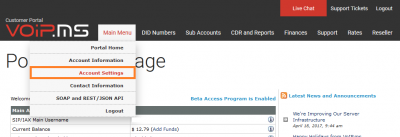 Account settings
-
- 2. Go to General Tab and there set the CallerID number
-
 General
-
- 1. Form your VoIP.ms Portal, go to "Account Settings" from Main Menu -> Account settings


Outbound Caller ID - Sub Accounts
- The Caller ID number for a sub account can be set during the creation process, or later by clicking Edit on the subaccount.
 CallerID field in a sub account

- * For calls to US and Canada, a 10-digit Caller ID number is required to ensure proper call termination. The portal's Caller ID field only supports numerical digits.
- * Toll free Caller IDs are not recommended, especially when Calling Toll free numbers, to reduce potential connection issues.
- If you are using an analog telephone adapter (ATA), IP phone, or softphone, this is where you need to adjust the settings.
- It is important to ensure that you transmit a valid caller ID to ensure proper termination.
- Here you will have the option of having one of your incomings DID numbers displayed as an outgoing call identification number.
- You can also use a personalized number that does not appear in your lists of DID numbers.
- However, you must respect the standards in force by the regulations to this effect.
- Always use a number that belongs to you or to that you have permission to use as the outgoing call display number.
- I use a system of capable of passing its own CallerID Number: If you have a PBX that manages the outgoing call identification number, you will have an option for this.
- Note: Using a Toll free outbound caller id is not recommended, especially when calling Toll-Free numbers.
Different methods of passing your Caller ID Number
CallerID Number: You can set the callerID Number or your DID Number or proceed with a verification process to pass the callerID of a number that is not within VoIP.ms network. If you have a a device capable of passing its own CallerID number such as a soft switch or PBX, make sure that the callerID matches a DID or a verified number from within your account to successfully make outgoing calls.
- Use one of my DIDs: If you want to pass one of your DID Numbers as the callerID Number, select this option and choose the DID, if more than one, that will display on the called party.
- Use a Verified CallerID: This is a quick verification process to ensure that the callerID you will pass is validated and authorized to be used. To start the process:
- 1. Simply click on Click here to get started above the CallerID Number setting
- 2. Follow the CallerID Verification Process
- 1. Select the country of your DID and Enter the number you want to verify.
- 2. You can also add a reference/note for your own use.
- 3. Choose the verification to be done by receiving a call or by receiving a SMS (only available for Canada/United States).
-
- 3. Once you press Send verification Code, you will receive a phone call / SMS message with a validation code.
- Enter that code in the Validation Code field and press Verify.
-
- Enter that code in the Validation Code field and press Verify.


- > If for any reasons you have not received the code, you can ask the system to send it again or press cancel to change the method you would like to receive the code.
- * I use a system capable of passing its own CallerID: If you are using a PBX, you will need to pass the callerID directly from your system.
- Our system will verify if the callerID you are passing matches one of your DID or one of your verified callerID.
- If you are passing an invalid callerID and attempt to make an outgoing call, our system will send you an email advising that a call was attempted with an invalid callerID.
Outbound caller ID number using Call Forwarding
- When you chose to forward all your incoming calls from your VoIP.ms number to an external phone number, the original's caller ID number will be transmitted to this external number.
- However, if the incoming caller is hiding their phone number this call will fail due to the new regulations for CID, on where sending a valid caller ID number is mandatory.
- A workaround is to create a filter for "Anonymous" calls along with another call forwarding entry but this one using the "Caller ID number override".
- This way, incoming calls using a valid CID will be transmitted to your external number showing the original's CID and incoming calls hiding their number will use the filter and the forward with caller ID Override, showing the CID override number and completing the call.
- To receive "Anonymous" calls when using call forwarding, follow these steps:
- 1. Go to DID Numbers>> Call forwarding section and create a new call forwarding entry to the same number you're forwarding to, but this new entry will contain the "Caller ID override". For the caller ID override, you can type your VoIP.ms number or any valid number you want to see when you receive an anonymous call. You might want to fill the "Description field" so you can identify this entry on the next step.
- 2. Thereafter, go to DID Numbers>> CallerID filtering section and create a new filter.
- * For step 1, mark "Anonymous CallerID number" checkbox
- * For step 2, this is optional you can choose to apply this filter to all your numbers or just to a specific one.
- * For Step 3, mark the "Call forwarding" checkbox and make sure to use the call forwarding entry with the caller ID override number.
- * Save your filter.
Incoming Caller ID number and name
- You will receive the Caller ID number and Caller ID name that the VoIP.ms server receives from the caller, this is exactly what will be sent to you on Incoming calls.
- You can always check what Caller ID number VoIP.ms receives by going into your Call Detail Records to check the incoming calls.
- The incoming Caller ID name works almost the same way, except that this is an optional setting that you need to enable per DID number on the DID settings page. This option is called "CallerID Name Lookup". : When enabled, the system will perform a query on the LIBD/CNAM Database, for callers with Canadian or US CID number, in order to find a name matching that CID number. The system then will display the result of this query in the Caller ID name portion of the Caller ID, leading to a "Caller ID name"<5551231234> when people call your number.
- If the calling number is already in your phone book, the name will be taken from there instead of doing a CNAM lookup on an external database.
- IMPORTANT NOTE FOR CANADIAN DIDs
- The majority of the Canadian DID numbers support CNAM Pass-Through.
- This means that for your incoming calls the system won't do a CNAM query (and also not charge you) if the incoming call already has a Caller ID name, even if the DID receiving the call has the CNAM queries enabled in your VoIP.ms customer portal.
Listen to the current account's Caller ID Number
- To listen to the caller ID set in the account you're dialing from, please dial 822 and the Caller ID number will be read back.
- Notice that it will depend on your device's dial plan or dial pattern for this to work.
- These test calls won't have any cost for you and will appear in your CDR as "CallerID Testing".
Configuring your CallerID with the Reseller Portal
- Once within the reseller portal, head into Services, My Services to see the callerID options.
- The options available are the same as your main account or sub accounts.
-

