SIP URI
From VoIP.ms Wiki
| [quality revision] | [quality revision] |
RogueScholar (Talk | contribs) (Reorganize lede section for improved coherency and add a more responsive layout to handle such a media-dense page) |
|||
| (13 intermediate revisions not shown) | |||
| Line 1: | Line 1: | ||
| - | {| class="wikitable" | + | {| class="wikitable" style="border: medium groove #ddd; border-collapse: collapse; box-shadow: 3px 3px 2px 1px #ccc; caption-side: bottom; float: right; margin: 0.4em 4rem 1.6em 2rem; text-align: center;" |
| - | |+ | + | |+ '''''Page translations''''' |
| - | |- | + | | style="font-weight: 500; min-width: 14em;" | Article en Français |
| - | + | | style="font-weight: 500; min-width: 14em;" | Artículo en Español | |
| - | |- | + | |- |
| - | | [ | + | ! scope="col" | [[SIP URI FR|SIP URI (French)]] |
| - | [ | + | ! scope="col" | [[Dirección URI (SIP URI)|Dirección URI (Spanish)]] |
|} | |} | ||
| + | An '''SIP URI''' (Session Initiation Protocol Uniform Resource Identifier) identifies the connection target for calling another person via SIP. In other words, a SIP URI is a user's SIP phone number. The addressing schema resembles an email address and is always constructed according to this format: | ||
| + | <code style="background-color: #e8e9ea; border: thin solid #ccc; display: block; font-size: 1rem; margin: 1em 0 1em 15%; padding: 1px 4px; white-space: nowrap; width: fit-content;">sip:<var>user</var>@<var><host_domain/IP></var>[:<var>port</var>]</code> | ||
| + | One example of a valid URI would be <code style="background-color: #f4f4f4; border: thin solid #ccc; font-size: 1.25em; padding: 1px 4px;">sip:[email protected]</code>. | ||
| - | A | + | A detailed treatment of the address schema and adjacent technologies can be found on English Wikipedia, specifically on the [[wikipedia:SIP URI scheme|SIP URI scheme]] and [[wikipedia:Telephone number mapping|telephone number mapping]] articles and those they link to. The addresses, which use the same <code style="background-color: #f4f4f4; border: thin solid #ccc; font-size: 1.25em; padding: 1px 4px;"><var>user</var>@<var>domain…</var></code> format as email addresses, allow an individual Internet telephony user to be called directly from another SIP client application/device without ever passing through the [[wikipedia:Public switched telephone network|public switched telephone network]] (PSTN) or incurring the tolls for doing so. |
| - | : | + | An SIP address may be used in a variety of ways, with some of the more common being: |
| - | + | * Receiving calls that originate from your SIP URI, using your DID number or an internal extension from a [[Sub Accounts|sub account]] | |
| - | + | ** We also offer "Virtual number" service for this use case, with the primary distinction that they can only connect to calls that are initiated using an SIP URI, and not traditional PSTN phone calls. By tightly defining their scope, we are able to price them very affordably at just 25¢/month plus 0.1¢/minute (one cent every ten minutes) for incoming calls. | |
| - | + | * As a [[Call Forwarding|forwarding destination]] for a [[Manage DID|VoIP.ms DID number]] | |
| - | + | * As a target for an individual speed dial entry (<div style="background-color: #f4f4f4; border: thin solid #ccc; display: inline-block; padding: 0 4px; vertical-align: top;">[[File:Material Design phone-dial icon (U+F1559).png|frameless|13px|link=]]<code style="font-size: 1.2em; font-weight: 500; margin: 0 0 0 0.4em; padding: 0;">*75<var>xx</var></code></div>) in your [[Phone book#Create a Phone Book Entry with a SIP URI|VoIP.ms address book]] | |
| - | + | * As a means of transferring incoming calls out to your various VoIP.ms extensions or numbers from outside Internet servers | |
| - | + | ||
| - | + | ||
| - | + | ||
Please note SIP URI is only functional through an external source, it is not intended to be used internally with VoIP.ms. | Please note SIP URI is only functional through an external source, it is not intended to be used internally with VoIP.ms. | ||
| - | |||
| - | |||
| - | |||
| - | |||
== Send calls to an external SIP URI address == | == Send calls to an external SIP URI address == | ||
| Line 32: | Line 28: | ||
: '''Make sure the other company or provider supports the use of SIP URI''' | : '''Make sure the other company or provider supports the use of SIP URI''' | ||
| + | |||
=== Creating a new SIP URI === | === Creating a new SIP URI === | ||
To make a SIP URI that can be used with multiple DIDs, use the {DID} tag. The {DID} expression will be replaced automatically by the DID number as it is listed in the "Manage DID section". | To make a SIP URI that can be used with multiple DIDs, use the {DID} tag. The {DID} expression will be replaced automatically by the DID number as it is listed in the "Manage DID section". | ||
| + | [[File:Forward.jpg|border|right]] | ||
| + | ; Examples : <ul><li><code style="background-color: #f4f4f4; border: thin solid #ccc; font-size: 1.25em; margin: 1.5em 0; padding: 1px 4px;">1{DID}@128.144.122.12</code></li><li><code style="background-color: #f4f4f4; border: thin solid #ccc; font-size: 1.25em; margin: 1.5em 0; padding: 1px 4px;">[email protected]</code></li><li><code style="background-color: #f4f4f4; border: thin solid #ccc; font-size: 1.25em; margin: 1.5em 0; padding: 1px 4px;">[email protected]:5080</code></li><li><code style="background-color: #f4f4f4; border: thin solid #ccc; font-size: 1.25em; margin: 1.5em 0; padding: 1px 4px;">[email protected]</code></li></ul> | ||
| - | + | ''Dialing out a SIP URI or using a SIP URI as forwarding does not generate cost (Outgoing call).'' | |
| - | + | ==== Two newer options for SIP URIs ==== | |
| - | : | + | * CallerID Override: Permits you to override the callerID that will be received on the receiving end of the SIP URI. |
| - | + | * CallerID E164: Your CallerID will become E164 compliant and thus show on the receiving end as +12123262233 (+(countrycode)(areacode)(number)). | |
| - | + | ||
| - | + | ||
| + | ==== Enabling TLS on SIP URI ==== | ||
| + | If you wish to proceed on having TLS enabled on your SIP URI, you will need to create an extended SIP URI, which you can do so with the information right below! | ||
| - | + | ===== Extended SIP URI Format (BETA) - SIP URI TLS ===== | |
| + | In addition to the standard format outlined above, an Extended SIP URI Format can also be used. This Format contains additional options as indicated below: | ||
| + | |||
| + | <code style="background-color: #f4f4f4; border: thin solid #ccc; font-size: 1.25em; font-weight: 700; padding: 1px 4px;">username[:password[:md5secret[:authname[:transport]]]]@host[:port]</code> | ||
| + | |||
| + | To specify any of the additional parameters of the Extended SIP URI Format, you must introduce one or more colon (:) characters between the username value and the @ character. Parameters are optional and read from left to right. To supply a particular parameter, it is necessary to precede it with the appropriate number of colons to its left. For example, to specify a username, password and transport, the SIP URI would be as follows: | ||
| + | |||
| + | username:password:::transport@host | ||
| + | |||
| + | Specifying the username, password and authname would be done as follows: | ||
| + | |||
| + | username:password::authname@host | ||
| + | |||
| + | The additional parameters of the Extended SIP URI Format are described below: | ||
| + | |||
| + | '''password''': This is the plain text password to be used when authentication is required by the destination endpoint. | ||
| + | |||
| + | '''md5secret''': Alternatively an md5 representation of the password can also be used instead of the plain text version when authentication is required by the destination endpoint. | ||
| + | |||
| + | '''authname''': An optional authentication name can also be supplied as a parameter, which will be used instead of the username. | ||
| + | |||
| + | '''transport''': A specific transport type can be specified for the outbound connection. Valid values for this parameter are 'tcp' for the TCP transport, 'tls' for TLS encrypted signalling, as well as 'udp' for UDP transport (the default). | ||
=== Creating a phone book entry === | === Creating a phone book entry === | ||
| + | : ''More information: '''[[Phone book#Create a Phone Book Entry with a SIP URI|Phone book § Entries for an SIP URI]]''''' | ||
A SIP URI may be associated with a [[phone book]] or speed dial entry in the same manner as any other telephone number. | A SIP URI may be associated with a [[phone book]] or speed dial entry in the same manner as any other telephone number. | ||
| - | |||
| - | |||
[[File:Pb entry sipuri.jpg|800px]] | [[File:Pb entry sipuri.jpg|800px]] | ||
| Line 59: | Line 78: | ||
=== Codec Negotation === | === Codec Negotation === | ||
| - | |||
By default when you route your incoming calls to an external SIP URI address, the system sends the INVITE allowing all VoIP.ms supported codecs (ulaw, g729a and GSM). | By default when you route your incoming calls to an external SIP URI address, the system sends the INVITE allowing all VoIP.ms supported codecs (ulaw, g729a and GSM). | ||
In that case if you want to use a specific codec (from the supported ones) you need to restrict that in your end. For instance, if you are using an Asterisk/PBX System and only wish to use ulaw codec, you will need to make sure to have the following settings in the trunk: | In that case if you want to use a specific codec (from the supported ones) you need to restrict that in your end. For instance, if you are using an Asterisk/PBX System and only wish to use ulaw codec, you will need to make sure to have the following settings in the trunk: | ||
| Line 66: | Line 84: | ||
: allow=ulaw | : allow=ulaw | ||
| - | |||
| + | == Receiving incoming calls from an SIP URI == | ||
=== Using your DID number === | === Using your DID number === | ||
You can receive SIP URI calls using the following format {Number}@sip.voip.ms, this can be used with your local US and Canada numbers, so they can be reached from outside. | You can receive SIP URI calls using the following format {Number}@sip.voip.ms, this can be used with your local US and Canada numbers, so they can be reached from outside. | ||
| + | [[File:Did.jpg|border|center]] | ||
| - | + | This format of a SIP address must follow this [[wikipedia:SIP URI scheme|SIP URI scheme]] as a means to reach VoIP.ms subscribers. | |
| - | + | ||
| - | This format of a SIP address must follow this [[wikipedia: SIP URI scheme | SIP URI scheme]] as a means to reach VoIP.ms subscribers. | + | |
Another variant, also valid, is to specify the specific VoIP.ms server on which your DID is registered, ie: | Another variant, also valid, is to specify the specific VoIP.ms server on which your DID is registered, ie: | ||
| Line 87: | Line 104: | ||
Important: no call flow or filtering can be applied to calls make to the external SIP URI. Calls will immediately ring the device registered to this sub-account. | Important: no call flow or filtering can be applied to calls make to the external SIP URI. Calls will immediately ring the device registered to this sub-account. | ||
| + | [[File:Extension.jpg|border|center]] | ||
| - | + | === Using a Virtual number === | |
| + | Virtual SIP numbers are similar to standard DID numbers. The major difference is that virtual SIP numbers are not accessible via "PSTN". They can only be reached via "SIP URI" over internet. For example, if you have a DID number with another provider and they support SIP URI Forwarding, you could forward your number to a virtual number at voip.ms just like if it was one of our numbers. | ||
| - | + | All virtual numbers consist of the following digits: 11 + Accountcode + 3 digits of your choice for a total of 11 digits. The final uri will be that number followed by the @ sign at one of our server. If you intend to send the calls to a phone or adapter, you'll need to point it to the proper server. | |
| - | + | ||
| - | + | : Example SIP URI: 11100000123@houston.voip.ms | |
| - | : | + | |
| - | + | [[File:Virtual SIP Number - Create new.png|border|center]] | |
| - | + | ||
| - | + | ||
| - | + | ||
| - | + | == Reseller Configuration == | |
| + | [[File:ResellerClient SelectClient Only.png|frame|right]] | ||
| + | Also if you're using the [[Reseller Basic Guide|Reseller Interface]], you can associate each SIP URI feature with one of your reseller client. | ||
| - | = | + | '''Reseller Client''': Here you can select your reseller client that you want to associate this feature. You need first to create the account of your customer using the [[Reseller Basic Guide|Reseller section]] in your Customer Portal.<div style="clear: right;"></div> |
| - | + | === SIP URI using the Reseller Interface === | |
| + | The feature is available for your client through the Reseller interface. You must enable this feature in your package in order to give them the ability to leverage this. | ||
| - | + | Note that the DID must be linked to your client. (Reseller > Manage Client's accounts > Click on '''Manage client''' where your client.) | |
| - | : | + | # [[File:SIPURI Reseller 1.png|thumb|none|304x256px|Go under the navigation bar on '''[Reseller]''' then click on '''[Manage Rates & Packages]'''.]] |
| + | # [[File:SIPURI Reseller 2.png|thumb|none|880x96px|Click on the Edit button to edit your package, or click on '''[Create a new package]''' to create a new one.]] | ||
| + | # [[File:SIPURI Reseller 3.png|thumb|none|800x480px|Go under the '''[Reseller System Configuration]''' Tab, and on the section "Type of configuration" select: '''[Package Configuration]''']] | ||
| + | # [[File:SIPURI Reseller 4.png|thumb|none|720x352px|Then scroll down and find the feature "'''SIP URI'''", and enable it.]] | ||
| + | |||
| + | ==== Add an SIP URI entry for a client ==== | ||
| + | <div style="columns: 2;"> | ||
| + | # [[File:SIPURI_Add.png|thumb|none|560x296px|To add a SIP URI entry for your client, or to help your client adding one. Go under the '''[Services]''' at the left navigation bar, then on '''[SIP URI]''']] | ||
| + | # [[File:SIPURI_Add2.png|thumb|none|760x320px|Click on the tab Add New SIP URI and enter the URI and a Description for the new entry. The description field will help the search bar or searchability.]] | ||
| + | # Click on the '''[Save SIP URI]''' button. | ||
| + | </div> | ||
| - | |||
| - | [[ | + | [[Category:Guides]] |
Latest revision as of 07:48, 3 March 2026
| Article en Français | Artículo en Español |
| SIP URI (French) | Dirección URI (Spanish) |
|---|
An SIP URI (Session Initiation Protocol Uniform Resource Identifier) identifies the connection target for calling another person via SIP. In other words, a SIP URI is a user's SIP phone number. The addressing schema resembles an email address and is always constructed according to this format:
sip:user@<host_domain/IP>[:port]
One example of a valid URI would be sip:[email protected].
A detailed treatment of the address schema and adjacent technologies can be found on English Wikipedia, specifically on the SIP URI scheme and telephone number mapping articles and those they link to. The addresses, which use the same user@domain… format as email addresses, allow an individual Internet telephony user to be called directly from another SIP client application/device without ever passing through the public switched telephone network (PSTN) or incurring the tolls for doing so.
An SIP address may be used in a variety of ways, with some of the more common being:
- Receiving calls that originate from your SIP URI, using your DID number or an internal extension from a sub account
- We also offer "Virtual number" service for this use case, with the primary distinction that they can only connect to calls that are initiated using an SIP URI, and not traditional PSTN phone calls. By tightly defining their scope, we are able to price them very affordably at just 25¢/month plus 0.1¢/minute (one cent every ten minutes) for incoming calls.
- As a forwarding destination for a VoIP.ms DID number
- As a target for an individual speed dial entry () in your VoIP.ms address book

*75xx - As a means of transferring incoming calls out to your various VoIP.ms extensions or numbers from outside Internet servers
Please note SIP URI is only functional through an external source, it is not intended to be used internally with VoIP.ms.
Contents |
Send calls to an external SIP URI address
You can route incoming calls to your DID numbers using a SIP URI address from other companies. You will need to create a string like youraccount@yourip to which you can route the DID(s).
- Make sure the other company or provider supports the use of SIP URI
Creating a new SIP URI
To make a SIP URI that can be used with multiple DIDs, use the {DID} tag. The {DID} expression will be replaced automatically by the DID number as it is listed in the "Manage DID section".

- Examples
-
1{DID}@128.144.122.12[email protected][email protected]:5080[email protected]
Dialing out a SIP URI or using a SIP URI as forwarding does not generate cost (Outgoing call).
Two newer options for SIP URIs
- CallerID Override: Permits you to override the callerID that will be received on the receiving end of the SIP URI.
- CallerID E164: Your CallerID will become E164 compliant and thus show on the receiving end as +12123262233 (+(countrycode)(areacode)(number)).
Enabling TLS on SIP URI
If you wish to proceed on having TLS enabled on your SIP URI, you will need to create an extended SIP URI, which you can do so with the information right below!
Extended SIP URI Format (BETA) - SIP URI TLS
In addition to the standard format outlined above, an Extended SIP URI Format can also be used. This Format contains additional options as indicated below:
username[:password[:md5secret[:authname[:transport]]]]@host[:port]
To specify any of the additional parameters of the Extended SIP URI Format, you must introduce one or more colon (:) characters between the username value and the @ character. Parameters are optional and read from left to right. To supply a particular parameter, it is necessary to precede it with the appropriate number of colons to its left. For example, to specify a username, password and transport, the SIP URI would be as follows:
username:password:::transport@host
Specifying the username, password and authname would be done as follows:
username:password::authname@host
The additional parameters of the Extended SIP URI Format are described below:
password: This is the plain text password to be used when authentication is required by the destination endpoint.
md5secret: Alternatively an md5 representation of the password can also be used instead of the plain text version when authentication is required by the destination endpoint.
authname: An optional authentication name can also be supplied as a parameter, which will be used instead of the username.
transport: A specific transport type can be specified for the outbound connection. Valid values for this parameter are 'tcp' for the TCP transport, 'tls' for TLS encrypted signalling, as well as 'udp' for UDP transport (the default).
Creating a phone book entry
- More information: Phone book § Entries for an SIP URI
A SIP URI may be associated with a phone book or speed dial entry in the same manner as any other telephone number.

SIP URI: Here you can either select Use Existing or Create New to assign the SIP URI to your Phone Book entry.
This replaces alphanumeric addresses (such as sip:[email protected]) with numeric abbreviations (such as *7501) which can be easily dialled from IP phones that only offer a numeric keypad.
Codec Negotation
By default when you route your incoming calls to an external SIP URI address, the system sends the INVITE allowing all VoIP.ms supported codecs (ulaw, g729a and GSM). In that case if you want to use a specific codec (from the supported ones) you need to restrict that in your end. For instance, if you are using an Asterisk/PBX System and only wish to use ulaw codec, you will need to make sure to have the following settings in the trunk:
- disallow=all
- allow=ulaw
Receiving incoming calls from an SIP URI
Using your DID number
You can receive SIP URI calls using the following format {Number}@sip.voip.ms, this can be used with your local US and Canada numbers, so they can be reached from outside.

This format of a SIP address must follow this SIP URI scheme as a means to reach VoIP.ms subscribers.
Another variant, also valid, is to specify the specific VoIP.ms server on which your DID is registered, ie:
Please note that the option to dial sip.voip.ms is more reliable than using the server as you won't have to specify the Point of Presence. Using the server instead, you will have to dial the correct server that the number is using.
Using your sub account internal extension
When you assign an internal extension for a sub account, it can also be used as an external SIP URI. For example, if your extension is 2, you could be reached directly via SIP from another network with a URI like this: [email protected]
- (Replace houston.voip.ms by the server you are registered to, 100000 by your account ID and the 2 by your internal extension).
Important: no call flow or filtering can be applied to calls make to the external SIP URI. Calls will immediately ring the device registered to this sub-account.

Using a Virtual number
Virtual SIP numbers are similar to standard DID numbers. The major difference is that virtual SIP numbers are not accessible via "PSTN". They can only be reached via "SIP URI" over internet. For example, if you have a DID number with another provider and they support SIP URI Forwarding, you could forward your number to a virtual number at voip.ms just like if it was one of our numbers.
All virtual numbers consist of the following digits: 11 + Accountcode + 3 digits of your choice for a total of 11 digits. The final uri will be that number followed by the @ sign at one of our server. If you intend to send the calls to a phone or adapter, you'll need to point it to the proper server.
- Example SIP URI: [email protected]

Reseller Configuration

Also if you're using the Reseller Interface, you can associate each SIP URI feature with one of your reseller client.
Reseller Client: Here you can select your reseller client that you want to associate this feature. You need first to create the account of your customer using the Reseller section in your Customer Portal.SIP URI using the Reseller Interface
The feature is available for your client through the Reseller interface. You must enable this feature in your package in order to give them the ability to leverage this.
Note that the DID must be linked to your client. (Reseller > Manage Client's accounts > Click on Manage client where your client.)
-
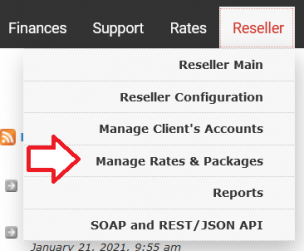 Go under the navigation bar on [Reseller] then click on [Manage Rates & Packages].
-
 Click on the Edit button to edit your package, or click on [Create a new package] to create a new one.
 -
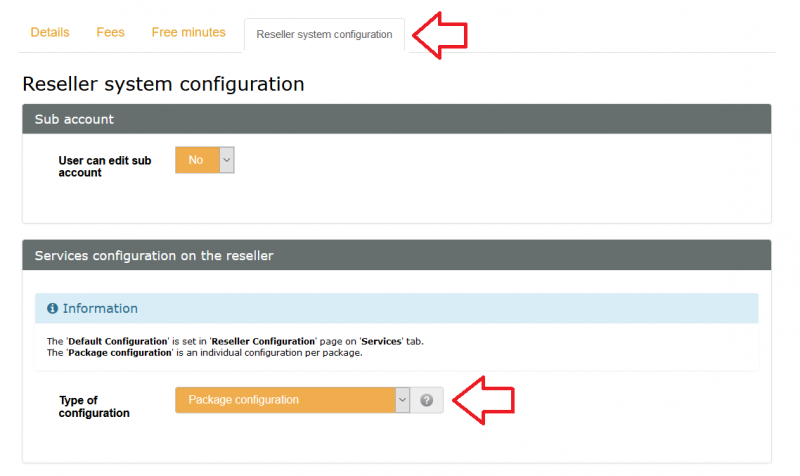 Go under the [Reseller System Configuration] Tab, and on the section "Type of configuration" select: [Package Configuration]
 -
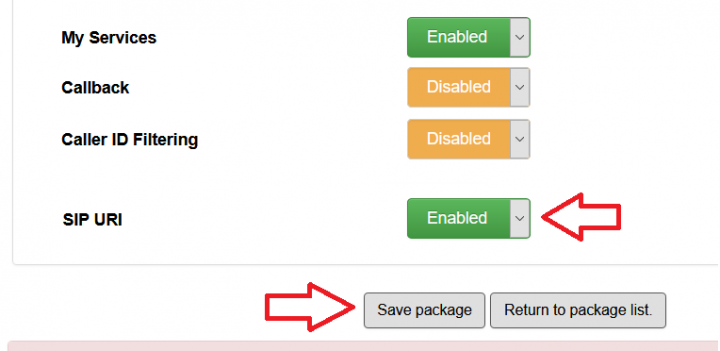 Then scroll down and find the feature "SIP URI", and enable it.


Add an SIP URI entry for a client
-
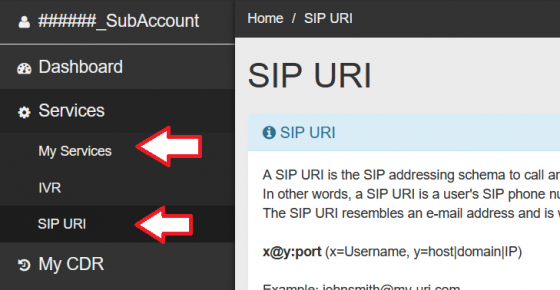 To add a SIP URI entry for your client, or to help your client adding one. Go under the [Services] at the left navigation bar, then on [SIP URI]
 -
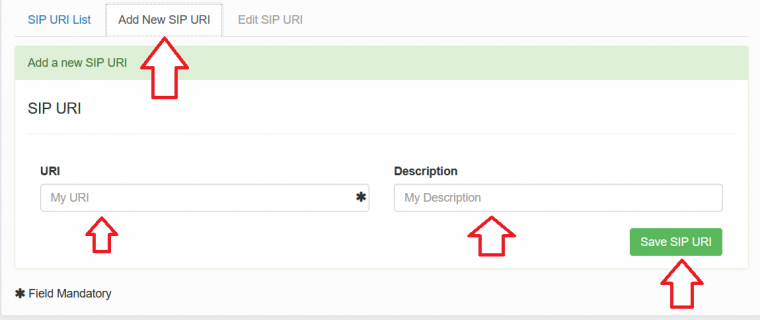 Click on the tab Add New SIP URI and enter the URI and a Description for the new entry. The description field will help the search bar or searchability.
 - Click on the [Save SIP URI] button.


